From PDF to TaxCycle: how the AI Tax Agent works, step by step
Between the PDF a client sends and the return in TaxCycle, there's a step every firm knows well: transcription. Here's what the DaxioOS AI Tax Agent does at each step, and what your team stays in control of.
By Sarah Kettani, founder and CEO of DaxioOS5 min read
Product · AI Tax Agent
From PDF to TaxCycle
 DaxioOS
From PDF to TaxCycle, today
At most firms, every slip that comes in follows the same path. Someone opens the PDF, finds the right boxes, retypes each amount into TaxCycle, then checks the entry. Repeated for every slip in every file, this transcription takes up a large share of tax season, without calling for any tax judgment. We looked at what it costs in an earlier article: Manual tax slip entry: what is it really costing your firm?
The AI Tax Agent takes the transcription off your team's plate without taking away control. It reads the slips, extracts the amounts and prepares the TaxCycle import files. Your team reviews every value before the files are generated, then imports them. Nothing goes into TaxCycle without your team seeing it first. Here's how it works, in seven steps.
The seven steps, from PDF to TaxCycle
Select the client
The AI Tax Agent is a desktop application for Windows. Work is done one client at a time: your team selects a client, processes their slips, then moves on to the next.
- The agent
- sets up the client's workspace.
- Your team
- selects the client to process.
Illustrative diagram Drop in the slips as received
Slips go in exactly as clients send them, as PDFs or scans, one or several at a time. There's no template to impose on clients and no CRA or Revenu Québec authorization to request: everything starts from documents the firm already has.
- The agent
- receives the client's documents.
- Your team
- drops in the slips, with no prior formatting.
Illustrative diagram Automatic slip type detection
The agent recognizes the type of each slip on its own: a T4, an RL-1, a T5, an RL-3. Federal slips and Québec RL slips from the same file are processed in a single pass.
- The agent
- detects the type of each slip.
- Your team
- doesn't have to sort or rename documents.
Illustrative diagram Box-by-box amount extraction
This is the step that replaces transcription. The agent reads the amounts box by box: employment income in box 14 of the T4, in box A of the RL-1, and so on for every slip. The SIN is never extracted.
- The agent
- extracts each amount into its box.
- Your team
- retypes nothing.
Illustrative diagram Review by your team
Human stepThis is where your expertise takes over. Your team can edit any extracted value before the file is generated. DaxioOS flags what's missing, but never assesses the tax treatment of a slip: the professional decides.
- The agent
- flags missing information.
- Your team
- reviews, corrects where needed and approves.
Illustrative diagram TaxCycle import file generation
Once the review is done, DaxioOS generates the TaxCycle import files: one file per slip type and per client.
- The agent
- generates the import files.
- Your team
- gets files that are ready to import.
Illustrative diagram Import into TaxCycle
In TaxCycle, with the client's return open, your team runs TaxCycle's Excel spreadsheet import (shown below in the French interface) and selects the file generated by DaxioOS. The amounts land in the return with no retyping, and preparation continues in TaxCycle as usual.
For the RL-24 and RL-31, first open the relevant form in the return, then run the same import.
- The agent
- provides files that are ready to import.
- Your team
- imports into TaxCycle and continues the preparation.
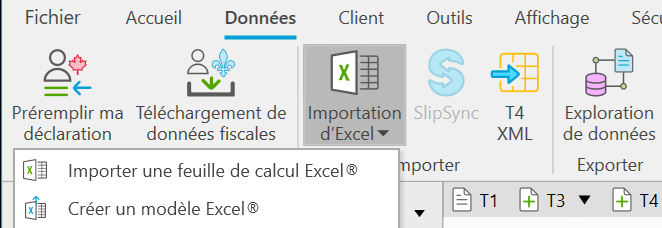
In TaxCycle (French interface shown): Données → Importation d'Excel → Importer une feuille de calcul Excel®
On real files, we observed nearly 60% less data-entry time.
Observed on real files, compared in collaboration with a Québec accounting team, for entry of supported slips. Tax analysis and review are not included. Your results may vary.
What the agent doesn't do
The AI Tax Agent has a specific job, and it sticks to it.
It makes no tax judgments.
It flags what's missing, but interpreting a slip and making preparation decisions remain your team's call.
It sends nothing to the CRA or Revenu Québec.
The files it generates are imported into TaxCycle by your team.
It doesn't replace TaxCycle.
Returns are still prepared, reviewed and filed from the software you already use.
DaxioOS is designed in Québec and designed for Quebec Law 25. Data is hosted in Canada, and the SIN is never extracted.
Supported slips
The agent supports the main federal slips and Québec RL slips, including the T4 and RL-1, and the T5 and RL-3. The full list is on the AI Tax Agent page.
Conclusion: less transcription, the same control
From dropping in the PDF to importing into TaxCycle, the AI Tax Agent handles the part that never needed expertise: reading a slip and retyping its amounts. Your team keeps the part that does: reviewing, deciding and preparing the return. For a first estimate at your firm, the calculator on the AI Tax Agent page gives an order of magnitude based on your own parameters.
See all seven steps in 30 minutes
A demo of the full workflow, from dropping in the slips to importing into TaxCycle.